Media Console with DVD Drawer Storage, Cyndi Collection
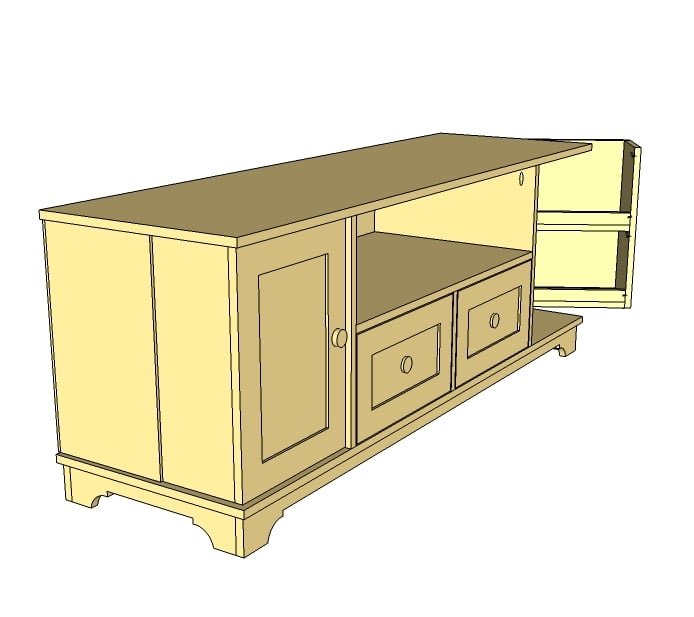
Yes, you can DIY a media console with doors sized perfectly for DVDs, roomy drawers, and even a generous spot for gaming and media equipment. This free, step by step plan is inspired by Pottery Barn's Cynthia Console, with cottage styling, two doors each with two shelves sized for DVD, two roomy drawers as well as cabinet storage. Fits flat panel tvs.
Specifications
| Project type | Media and Entertainment Centers |
|---|---|
| Room | living room |
| Style | Cottage Style Furniture Plans |
| Difficulty | Advanced |
| Estimated cost | $150 - $200 |
Dimensions
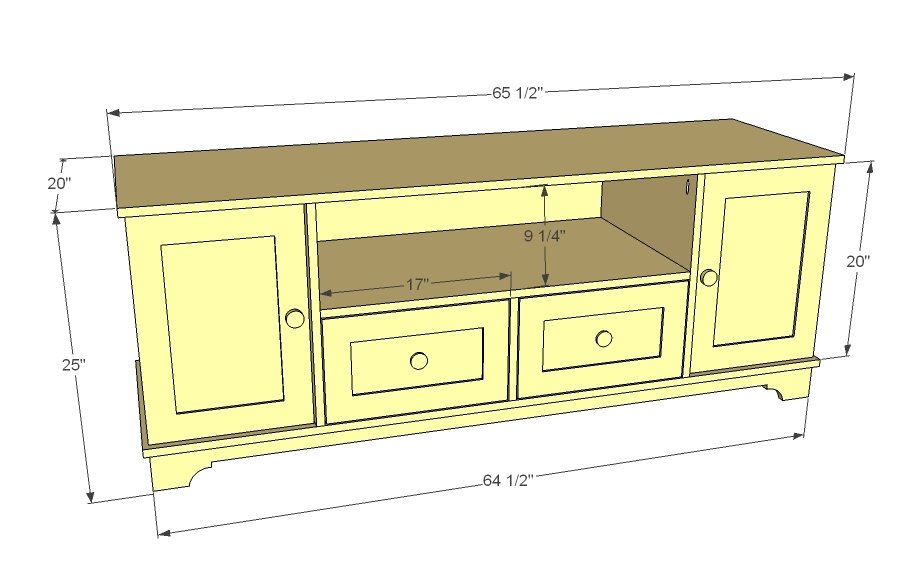
Use the size-specific shopping and cut lists below.
Shopping List
1 1/2 sheets of 3/4" plywood or MDF
1/4 sheet of 1/2" plywood or MDF
1 sheet of 1/4" plywood or MDF
1 - 1x12 @ 6 feet long
2 - 1x4 @ 8 feet long
2 - 2x2 @ 8 feet long
3 - 1x3 @ 8 feet long
1 - 1x2 @ 8 feet long
3 - 1x8 @ 8 feet long
2 - 16" Drawer Slides, Side/Undermount like these
2 - Sets narrow profile hinges
Cut List
Boards referred to as 1x20s measure 3/4" thick x 20" wide, cut to given lengths.
Boards referred to as 1x12s measure 3/4" thick x 11 1/4" wide, cut to given lengths.
Boards referred to as 1x8s measure 3/4" thick x 7 1/4" wide, cut to given lengths.
This plan also uses 2x2s (1 1/2" x 1 1/2"), 1x4s (3/4" x 3 1/2") and 1x3s (3/4" x 2 1/2")
Make sure your boards measure to these widths.
Cut List for Main Box
2 - 1x20 @ 20" (Vertical Partitions)
1 - 1x20 @ 10" (Drawer Partition)
1 - 1x20 @ 34 3/4" (Open Shelf Bottom)
2 - 1x20 @ 65 1/2" (Top and Bottom)
2 - 1x12 @ 20" (Sides)
2 - 1x12 @ 13 1/4" (Cabinet Shelf)
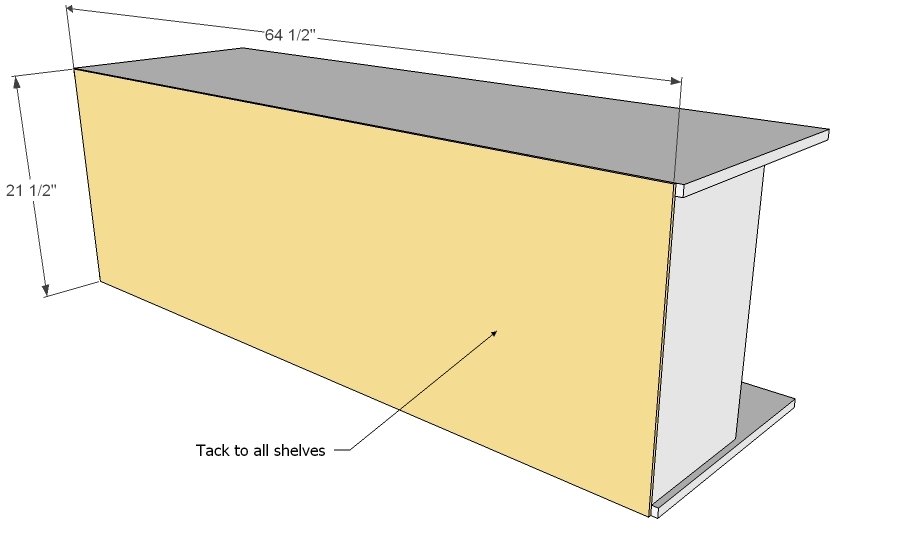
1 - 1/4" Plywood @ 21 1/2" x 64 1/2" (Back)
Cut List for Base
2 - 2x2 @ 63"
2 - 1x4 @ 17 3/4"
2 - 1x4 @ 64 1/2"
Cut List for Door Storage (2)
4 - 1x8 @ 19 3/4"
4 - 1x8 @ 12 1/2"
4 - 1x2 @ 12 1/2" (Optional ledges to keep contents in door storage)
Cut List for Doors (2)
4 - 1x3 @ 14 3/4"
4 - 1x3 @ 14"
1 - 1/2" Plywood @ 14 3/4" x 9" (Center Panel)
Cut List for Drawers (2)
4 - 1x8 @ 14 1/2"
4 - 1x8 @ 16 1/2"
2 - 1/4" Plywood @ 16" x 16 1/2"
Cut List for Drawer Faces (2)
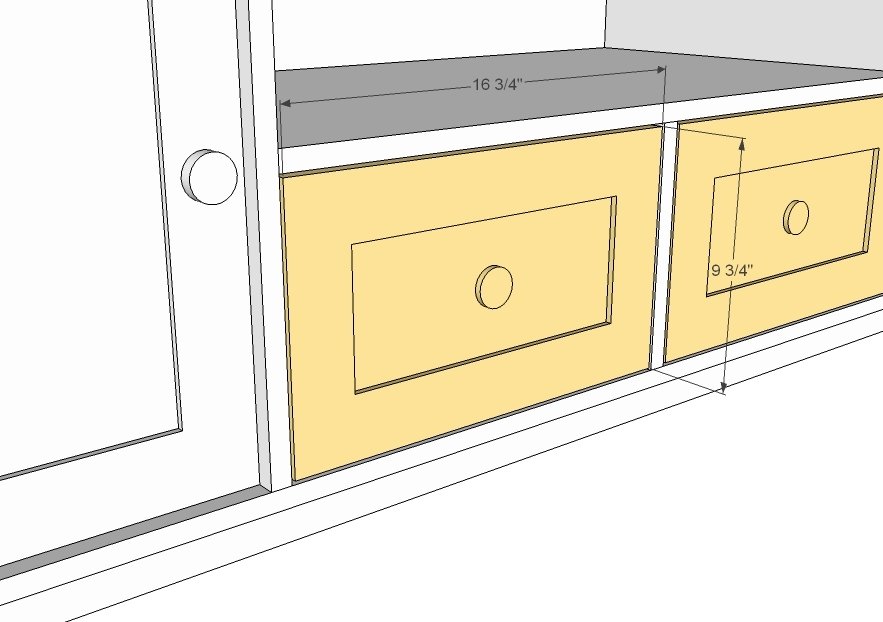
4 - 1x3 @ 16 3/4"
4 - 1x3 @ 4 3/4"
2 - 1/2" Plywood @ 4 3/4" x 11 3/4"
Tools
- measuring tape
- square
- pencil
- safety glasses
- hearing protection
- kreg-jig
- drill
- circular saw
- jigsaw
- table saw
- nailer
- sander
- level
- countersink drill bit
Step-by-step Instructions
Step 1
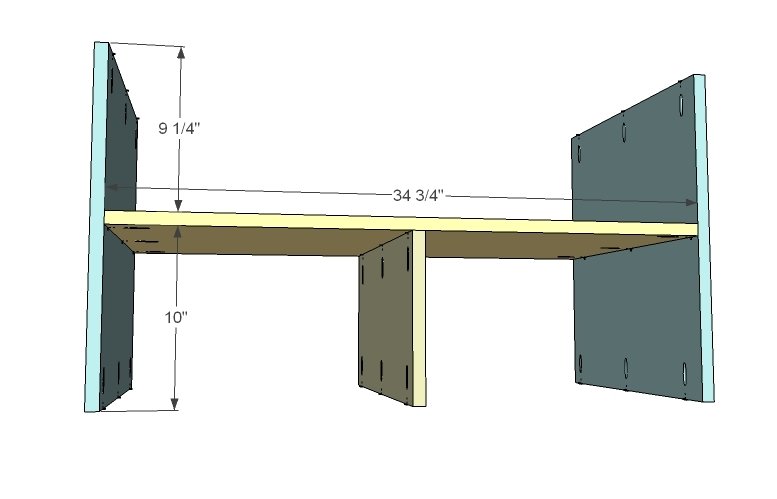
Shelf partitions. Attach shelf partitions as shown in diagram, using either pocket holes set for 3/4" stock and 1 1/4" pocket hole screws or 2" screws countersunk. Use glue. It is very important that you take extra measures to square up project - your drawers and doors won't fit right if you don't.
Step 2
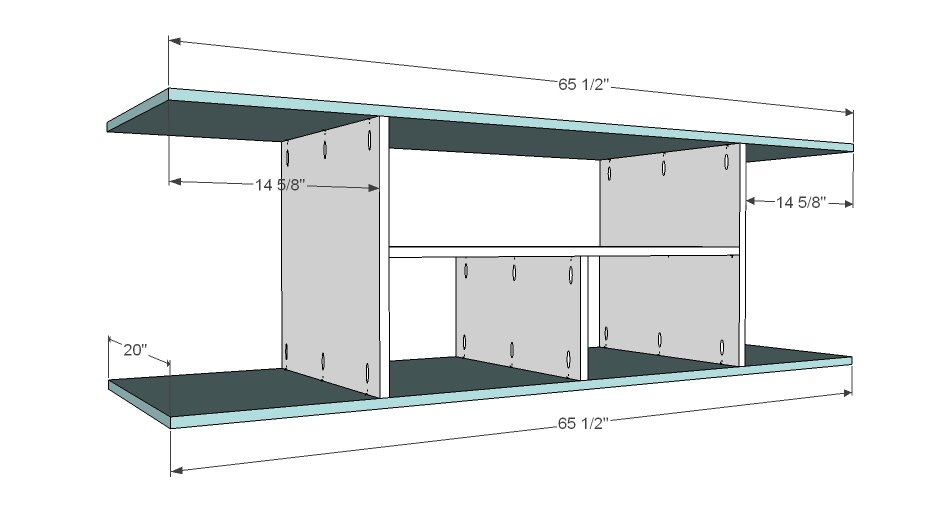
Next add the top and bottom to the project. Pocket holes are shown. It may be difficult to attach the center drawer divider with pocket holes due to drill clearance - so fasten from the bottom of the cabinet. Adjust for square.
Step 3
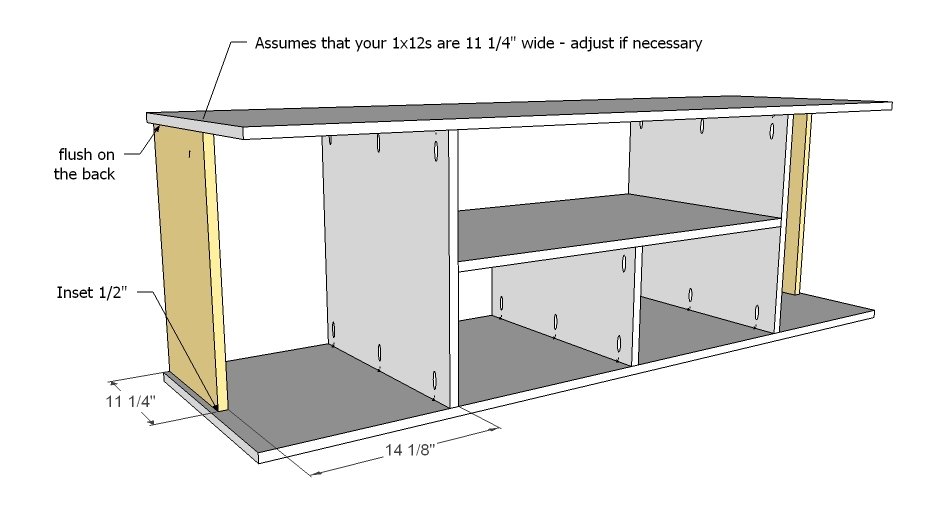
The sides are 1x12s. This plan is designed for 1x12s that measure 11 1/4" in width. Measure the width of your 1x12s and rip down if necessary with tablesaw. Attach the 1x12s as shown above, with a 1/2" gap on the outsides as shown in diagram. You can click on any diagram for expanded views.
Step 4
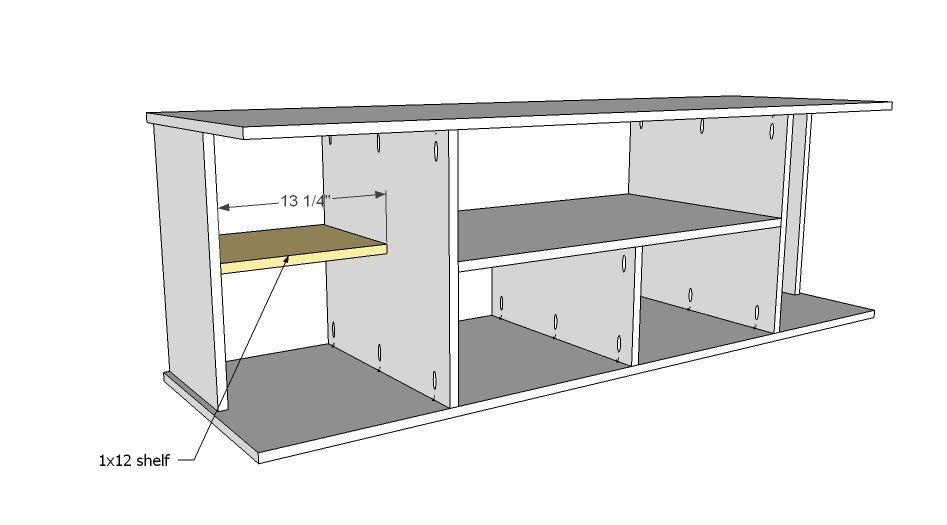
Now add a shelf in each of the side cabinets as shown above. You can either make the shelves fixed by screwing in place, or drill holes for shelf pins for adjustable shelves.
Step 5
Step 6
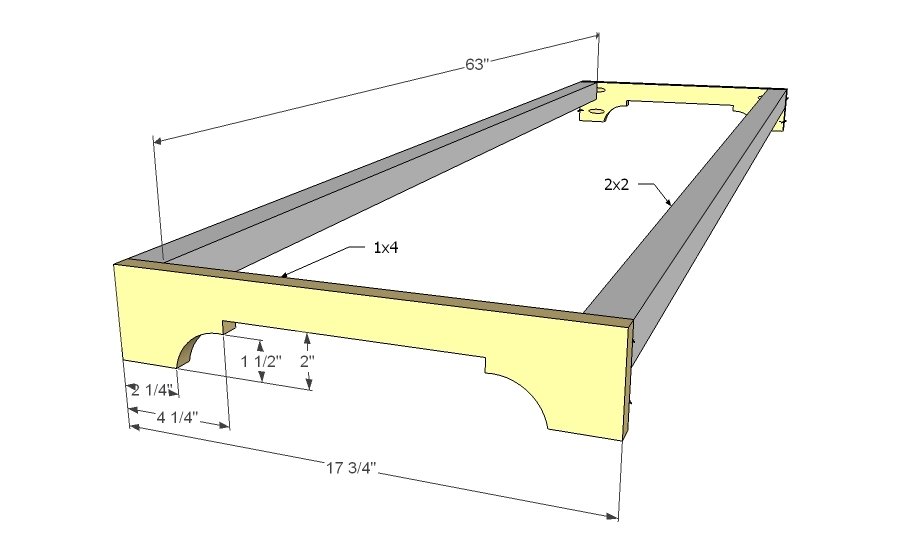
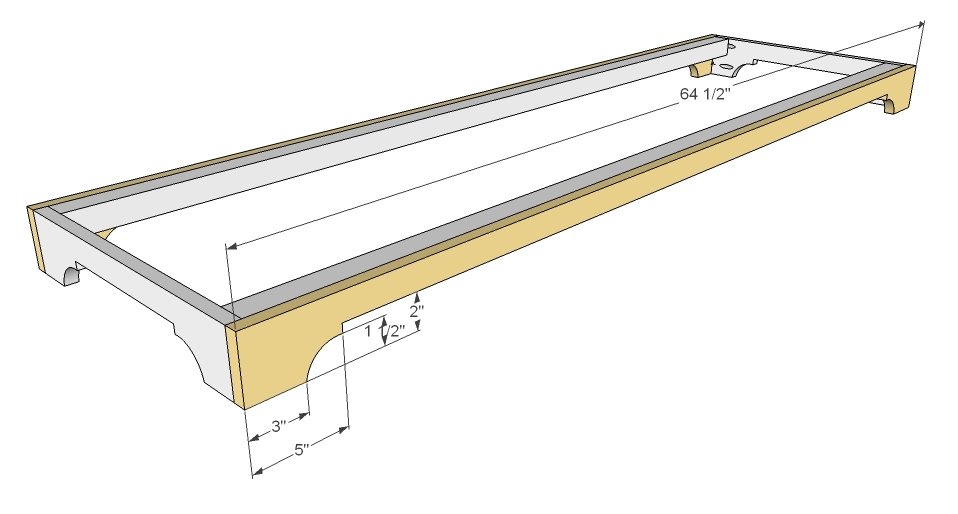
For the footer, first mark and cutout the footer with a jigsaw as shown above. Sand until jigsaw edges are smooth and match. For the long straight part of the cut, I personally would use a circular saw. Note that the front footer is slightly different, although the same pattern. Attach side footers to the 2x2s with glue and screws.
Step 7
Mark front and back footers and cut out as you did the side footers. Attach to both side footers and the 2x2 cleats.
Step 8
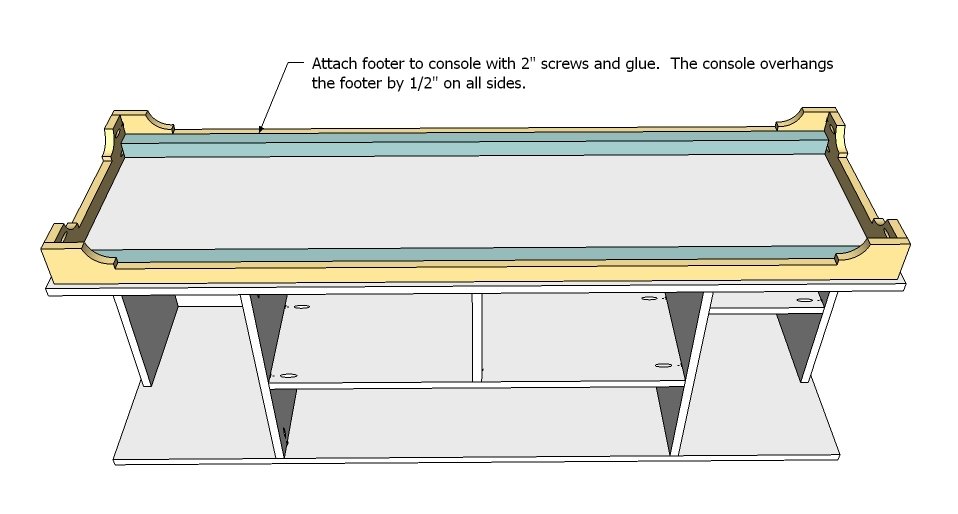
Now the fun part. Attach to the cabinet base as shown in diagram, using 2" wood screws and glue.
Step 9
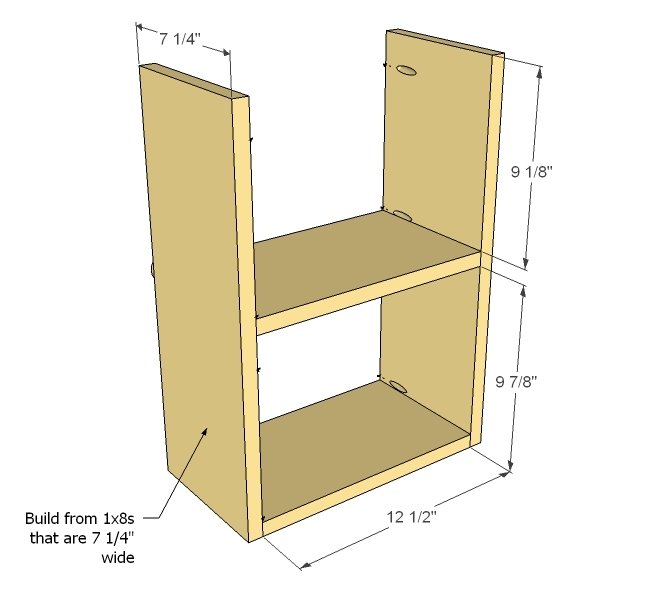
Door Storage. You will need to build two of these, and they will need to be very square. Check the width of your 1x8s, ensuring the width is 7 1/4" wide. Build as shown above.
Step 10
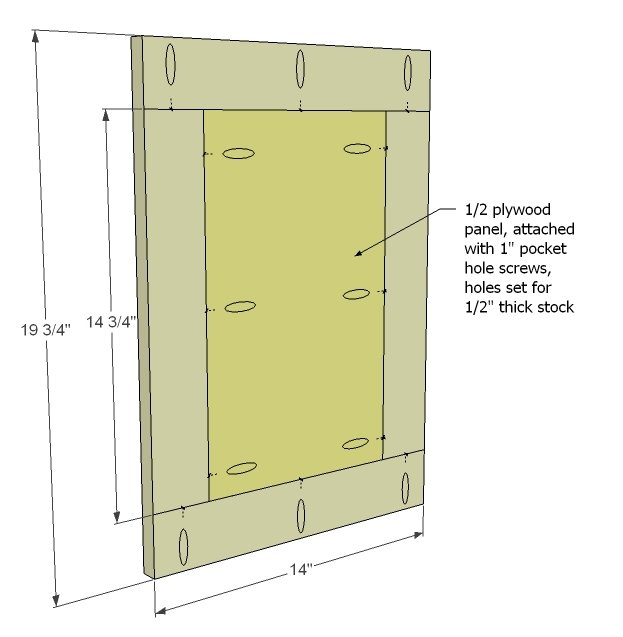
Doors. There are many ways to build doors, ranging from super complicated to uberly easy. Easy is shown above. Use 1/2" plywood for the panel, framed in 1x3s. Remember that you will need to set your Kreg Jig for 1/2" stock when fastening the panel to the frame. Then you will need to set the Kreg Jig for 3/4" stock when attaching the frame boards together. For a tutorial on something very similar - except you can skip the raised panel part - go here.
Step 11
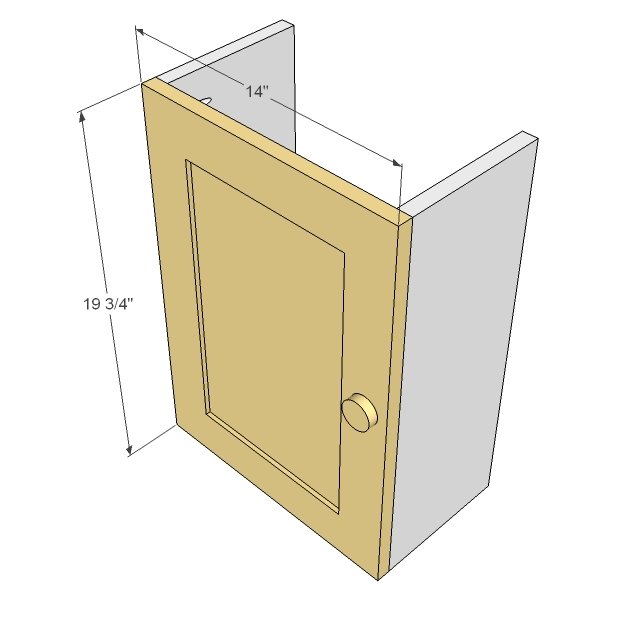
Now attach door to door storage. Outside edges should be flush. You can use either pocket holes from inside or finsih nails from outside.
Step 12
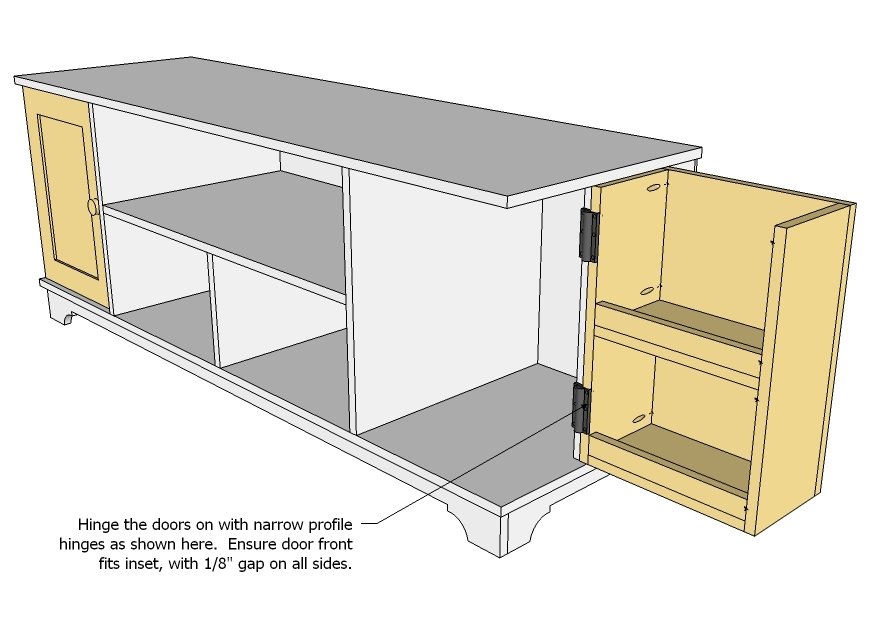
The tricky part about putting the doors on is getting them to swing easily. The plan gives 1/8" clearance on top/bottom of the door. Attach hinges as shown in diagram. Adjust hinges so door closes smoothly.
Step 13
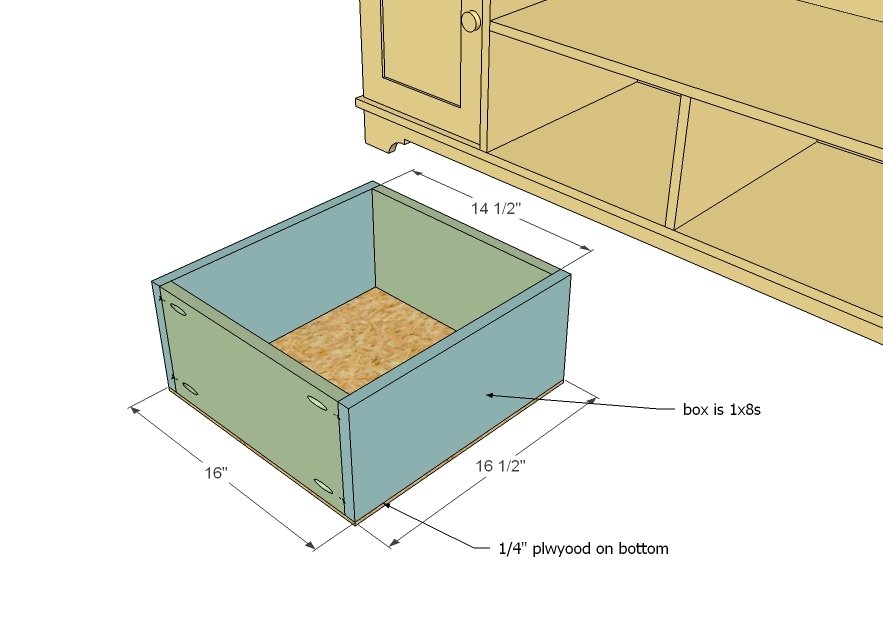
Drawers. Build drawers as shown above. Attach plywood to bottom with 1 1/4" finish nails and glue. Take extra precautions to ensure drawers are very square.
Step 14
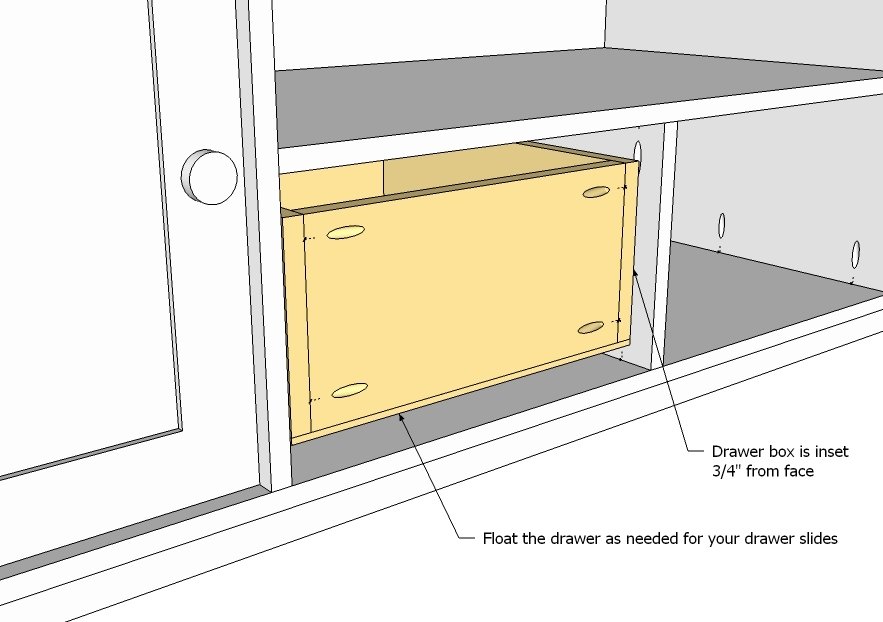
When used properly, drawer slides really aren't that difficult to install. The main thing is to remember that the door face needs 3/4", so the slides/drawer needs to be inset 3/4" at this step. I've got a tutorial on how to install drawer slides here.
Step 15
Build the door faces to fit, as you did the cabinet doors. The measurements shown above are for an 1/8" gap on all sides of the drawer face. My trick for perfect looking drawer faces? With the drawer box full inserted, place the drawer face over the drawer box, centering the face on the opening. Next comes just a few 1/4" finish nails through the drawer face frame into the drawer box. Then open the drawer, and screw the face on from the backside. Be considerate of the location of pulls/handles when nailing/screwing.
Finishing
Sand all surfaces, starting with a medium grit and finishing with fine. Wipe off the dust, fill any holes or gaps with wood filler, and sand smooth once dry. Apply primer if you're painting, then finish with your choice of paint or stain and seal with a durable clear topcoat. For outdoor projects, use exterior-rated primer, paint or stain, and sealer so the piece stands up to the weather.
Source (temporary): https://www.ana-white.com/woodworking-projects/media-console-dvd-drawer-storage-cyndi-collection